


For about 4½ minutes on April 8, millions of Americans will see their Monday plunge prematurely into darkness.
If you’re lucky — or if you’ve planned a trip into the path of this year’s total eclipse — you’ll be among them. And what better way to mark the moment than with a few gorgeous eclipse pics?
The catch: Capturing worthwhile images of basically anything in space with a phone can be tricky, especially when your subject is a massive, incandescent ball of gas. Need proof? Go outside, try taking a picture of the midday sun, and see whether you capture anything more than just indistinct brightness.
Thankfully, taking photos of a total eclipse is easier than you might expect — as long as you’re prepared. Here’s how you might be able to get a few stunning eclipse pictures for your records without hurting yourself, or your phone.

Tools to shoot the eclipse
With a little preparation, a little patience, the
right settings and some simple equipment, you can capture decent images even if your location is under
a partial eclipse.
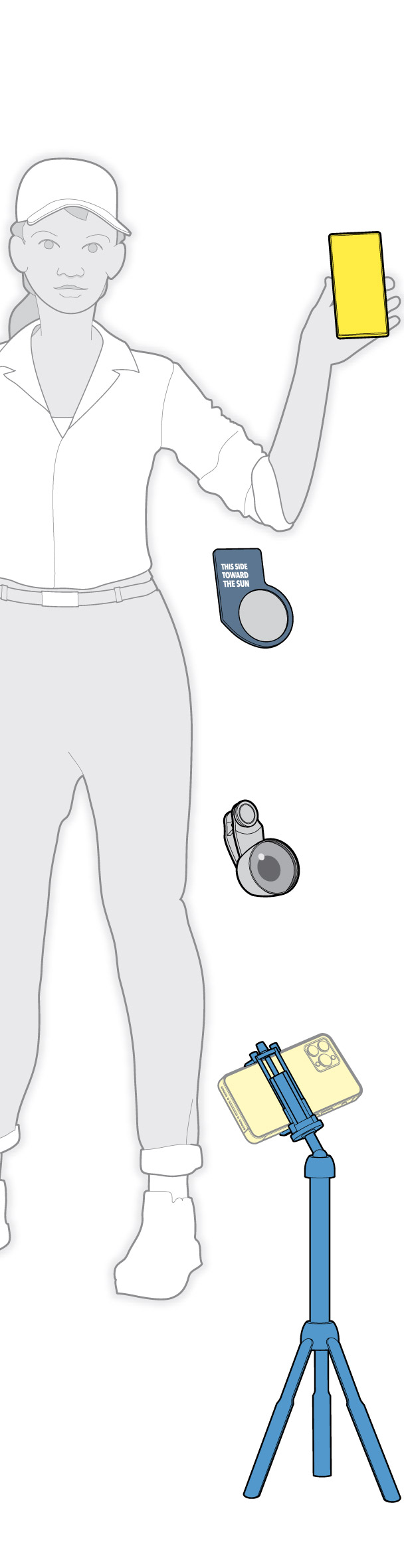
Cellphone. Make sure it’s got clean lenses and a good charge.
Sun filter. Inexpensive and readily available. You won’t get a good image without it.
Clip-on telephoto attachment. Not absolutely necessary
but worth a try.
Tripod. You’ll need to steady your phone, so a tripod or another creative solution is required.

Tools to shoot the eclipse
With a little preparation, a little patience, the
right settings and some simple equipment, you can capture decent images even if your location is under
a partial eclipse.
Cellphone. Make sure it’s got clean lenses and a good charge.
Sun filter. Inexpensive and readily available. You won’t get a good image without it.
Clip-on telephoto attachment. Not absolutely necessary
but worth a try.
Tripod. You’ll need to steady your phone, so a tripod or another creative solution is required.

Tools to shoot the eclipse
With a little preparation, a little patience, the right settings and some simple equipment,
you can capture decent images even if your location is under a partial eclipse.
Cellphone. Make sure it’s got clean lenses and a good charge.
Sun filter. Inexpensive and readily available. You won’t get a good image without it.
Clip-on telephoto attachment. Not absolutely necessary
but worth a try.
Tripod. You’ll need to steady your phone, so a tripod or another creative solution is required.

Tools to shoot the eclipse
With a little preparation, a little patience, the right settings and some simple equipment,
you can capture decent images even if your location is under a partial eclipse.
Cellphone. Make sure it’s got clean lenses and a good charge.
Sun filter. Inexpensive and readily available. You won’t get a good image without it.
Clip-on telephoto attachment. Not absolutely necessary
but worth a try.
Tripod. You’ll need to steady your phone, so a tripod or another creative solution is required.
(function (containerId, opts) {
if (!(“querySelector” in document)) return;
var container = document.getElementById(containerId);
var nameSpace = opts.namespace || ”;
var onResize = throttle(update, 200);
var waiting = !!window.IntersectionObserver;
var observer;
update();
document.addEventListener(“DOMContentLoaded”, update);
window.addEventListener(“resize”, onResize);
// NYT Scoop-specific code
if (opts.setup)
opts.setup(container).on(‘cleanup’, cleanup);
function cleanup()
document.removeEventListener(“DOMContentLoaded”, update);
window.removeEventListener(“resize”, onResize);
if (observer) observer.disconnect();
function update()
var artboards = selectChildren(“.” + nameSpace + “artboard[data-min-width]”, container),
width = Math.round(container.getBoundingClientRect().width);
// Set artboard visibility based on container width
artboards.forEach(function(el)
var minwidth = el.getAttribute(“data-min-width”),
maxwidth = el.getAttribute(“data-max-width”);
if (+minwidth = width );
// Initialize lazy loading on first call
if (waiting && !observer)
if (elementInView(container))
waiting = false;
update();
else
observer = new IntersectionObserver(onIntersectionChange, );
observer.observe(container);
function elementInView(el)
var bounds = el.getBoundingClientRect();
return bounds.top 0;
// Replace blank placeholder image with actual image
function updateImgSrc(img)
var src = img.getAttribute(“data-src”);
if (src && img.getAttribute(“src”) != src)
img.setAttribute(“src”, src);
function onIntersectionChange(entries)
if (entries.length && entries[0].isIntersecting)
waiting = false;
observer.disconnect();
observer = null;
update();
function selectChildren(selector, parent)
return parent ? Array.prototype.slice.call(parent.querySelectorAll(selector)) : [];
// based on underscore.js
function throttle(func, wait)
var timeout = null, previous = 0;
function run()
previous = Date.now();
timeout = null;
func();
return function()
var remaining = wait – (Date.now() – previous);
if (remaining wait)
clearTimeout(timeout);
run();
else if (!timeout)
timeout = setTimeout(run, remaining);
;
})(“g-01-inventory-box”, );
#g-01-inventory-xxsmall display: none
@media (max-width: 383px) and (min-width: 260px)
#g-01-inventory-xxsmall
display: block
#g-01-inventory-xsmall display: none
@media (max-width: 639px) and (min-width: 384px)
#g-01-inventory-xsmall
display: block
#g-01-inventory-medium display: none
@media (max-width: 959px) and (min-width: 640px)
#g-01-inventory-medium
display: block
#g-01-inventory-xlarge display: none
@media (min-width: 960px)
#g-01-inventory-xlarge
display: block
Your smartphone. To get as up-close a picture as possible, use your phone’s telephoto (also known as zoom) camera if it has one. The iPhone 15 Pro, for instance, has a telephoto camera with a 3x optical zoom — which will provide the best visual quality — and up to 15x digital zoom if you’re okay with less crisp results. Samsung’s Galaxy S Ultra phones offer between 3x and 10x optical zoom, but a built-in Space Zoom feature means you can push in as far as 100x.
If your phone doesn’t have a telephoto camera, or if you want even more range, consider using a telephoto lens attachment. In general, these cost between $30 and $50, and if you are considering buying one, search for a lens that offers the most magnification possible.
A tripod. This can help in a few ways: It will keep your phone framed just right, reduce the possibility of a sneeze or a gust of wind messing up your photo, and keep you from having to look in the direction of the sun before the moon passes fully in front of it.
A solar filter. This will dramatically reduce the amount of light that enters your phone’s camera and help to protect the precious sensor inside.
You won’t need it during totality — the money-shot moment when the moon is sitting directly in front of the sun — but it’s crucial for the moments before and after when the sun is only partially obscured.
A way to mount the filter. If you’re using a small sheet and relying on your phone’s built-in cameras, you can easily tape a filter in front of it or hold it in place. You could also use a filter adapter that fits in front of your phone’s lenses that lets you screw in dedicated filters for non-phone cameras.
For the best results, you may also want to consider fitting a bit of black cloth around the filter to minimize the amount of external light that bleeds into your images.