



With iOS 15, Apple expanded the Do Not Disturb feature from iOS 14 into a full Focus Mode option that’s designed to allow users to set up different scenarios to manage their incoming notifications.
Focus Mode is handy because it lets you decide exactly what alerts and apps you want to see at home, while at work, when sleeping, when exercising, and in other situations, but as Reddit users have pointed out, Apple has dropped a key Do Not Disturb feature.
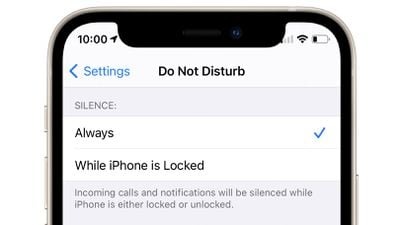
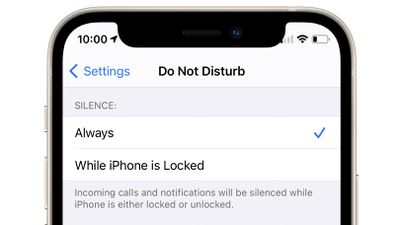
Do Not Disturb in iOS 14 had a setting that allowed incoming calls and notifications to be silenced at all times, or only when the iPhone was locked. With this setting, you could turn on Do Not Disturb but still get all of your calls and notifications if you unlocked your phone and were actively using it.
Some people used this setting to have Do Not Disturb active at all times during the day so the iPhone was silenced when it was locked, but they weren’t missing alerts when the iPhone was in use. From Reddit:
Really surprised they’ve done this, but it appears there is no longer an option in iOS 15 to still show notifications when in Do Not Disturb but unlocked.
My phone basically lived on Do Not Disturb mode up until now but I’ll have to stop using it now which is really annoying.
Like, I don’t want notifications when my phone is locked, but while I’m actively using it I still need them to pop up.
There is no equivalent setting in Focus Mode, so there’s no longer an option to receive notifications when the iPhone is unlocked and silence them when it’s not in use. With Focus Mode, it’s an all or nothing experience – notifications are being received, or they’re silenced in all situations.
Many Reddit users are unhappy with the change and are hoping that Apple will reintroduce a similar feature in a future iOS 15 update.
Top Stories
Apple today, with iOS 15, announced a slew of new changes coming to notifications on iPhone, including a completely redesigned interface and a new way to summarize notifications based on activities. Notifications now have a completely new design on the lock screen, featuring richer images for messages, and a cleaner more compact look. With the redesign, iOS 15 also introduces a Notification …
Apple Teases iOS 15 Features Ahead of Sept 14 Apple Event
Ahead of next week’s Apple event, Apple has begun teasing iPhone users about upcoming iOS 15 features using a notification from the Tips app.
“See what’s coming in iOS 15,” reads the notification. “Learn about new features that will help you stay connected and find focus.”
Tapping the notification takes users on a brief tour of upcoming features, including Voice Isolation, the new Shared…
Apple Releases watchOS 8 With Mindfulness App, Focus Mode, Messages Updates, Find My and Contacts
Apple today released watchOS 8, the newest version of the watchOS operating system designed to run on modern Apple Watch models. watchOS 8 is compatible with the Apple Watch Series 3 and later.
watchOS 8 can be downloaded for free through the dedicated Apple Watch app on the iPhone by going to General > Software Update. To install the new software, the Apple Watch needs to have at least…
Apple Seeds iOS and iPadOS 15 Release Candidates to Developers
Apple today seeded the release candidate versions of iOS and iPadOS 15 to developers for testing purposes, with the updates coming two weeks after Apple released the eighth betas.
Registered developers can download the profile for the iOS and iPadOS betas from the Apple Developer Center, and once the profile is installed, beta updates will be available over the air.
iOS 15 is a major…
Apple Seeds Eighth Betas of iOS and iPadOS 15 to Developers [Public Beta Available]
Apple today seeded the eighth betas of iOS and iPadOS 15 to developers for testing purposes, with the updates coming one week after Apple released the seventh betas.
Registered developers can download the profile for the iOS and iPadOS betas from the Apple Developer Center, and once the profile is installed, beta updates will be available over the air.
iOS 15 is a major update that…
Apple Seeds Seventh Betas of iOS and iPadOS 15 to Developers [Update: Public Beta Available]
Apple today seeded the seventh betas of iOS and iPadOS 15 to developers for testing purposes, with the updates coming one week after Apple released the sixth betas.
Registered developers can download the profile for the iOS and iPadOS betas from the Apple Developer Center, and once the profile is installed, beta updates will be available over the air.
iOS 15 is a major update that…
Apple Seeds Sixth Betas of iOS and iPadOS 15 to Developers
Apple today seeded the sixth betas of iOS and iPadOS 15 to developers for testing purposes, with the updates coming one week after Apple released the fifth betas.
Registered developers can download the profile for the iOS and iPadOS betas from the Apple Developer Center, and once the profile is installed, beta updates will be available over the air.
iOS 15 is a major update that…
Apple Announces iOS 15: First Look at New Features
Apple today previewed iOS 15, the company’s next major update for the iPhone, featuring new video calling capabilities, improvements to Messages, user statuses, a smart notification summary, and more.
FaceTime
In iOS 15, FaceTime features a new grid view and portrait mode support for video. For audio, FaceTime calls now offer Spatial Audio so that voices sound as if they are coming from…

Follow Canada News Media
Get the day's top Canadian stories and our two daily 60-second news videos wherever you scroll.
X Threads Facebook Instagram LinkedIn TikTok YouTube Pinterest Reddit Substack Flipboard Newsletter RSS